


















Google has declared it is updating Google Meet on the web with a new picture-in-picture mode. This is a significant multitasking feature include that will permit you to see what’s going on during a Google Meet video call while as yet having the option to direct other work on your PC. Here’s how the feature works.
How does picture-in-picture mode work in Google Meet?
Google is just offering the picture-in-picture mode to Google Meet on the web.
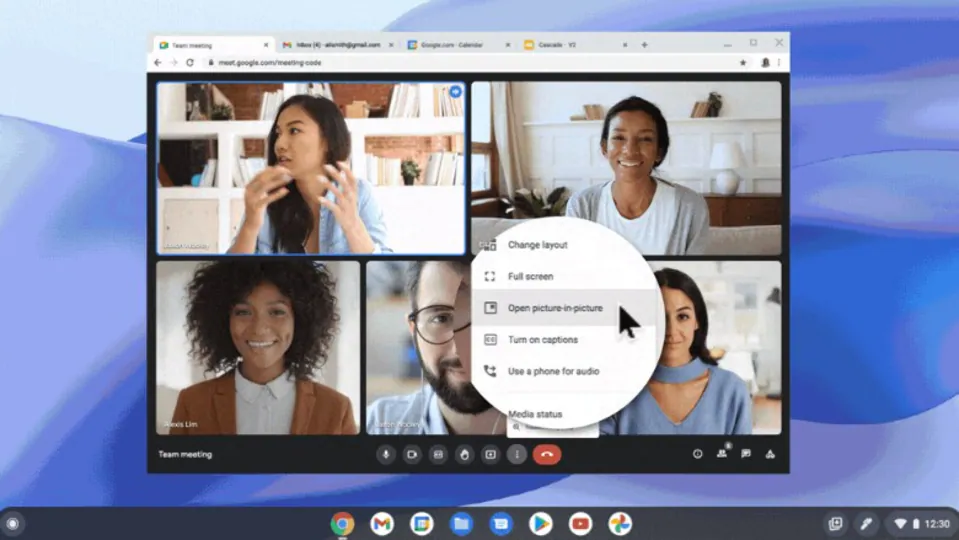
In other words, it’s simply accessible to you in the event that you are in a Meet video call using meet.google.com in the Chrome browser. Provided that this is true, when you enter picture-in-picture mode, you’ll have the option to see up to four video tiles of meeting participants in a floating window on top of different applications. In a quick demo, Google demonstrated the way that you could drift your Meet video call to the base right of your screen and keep on doing different tasks, including in the Chrome web browser, for example, send an email.
How to turn on picture-in-picture mode in a Google Meet
Begin or join a Google Meet web-based video call from the Chrome browser.
At the bottom of your Meet tab, click More options (three dots).
Then, at that point, select Open picture-in-picture.
That is all there is to it!
Are there controls for picture-in-picture mode in Google Meet?
There are no admin controls accessible for the new feature.
When will picture-in-picture mode be accessible in Google Meet?
The rollout began on 16 June 2022 and is expected to take a couple of weeks to complete.
Could anybody at any point involve picture-in-picture mode?
The new feature is accessible to:
All Google Workspace customers
All legacy G Suite Basic and Business customers
All users with personal Google Accounts